Payload CMS – Lessons from Hostcraft
A code-first CMS built on Next.js: a modern interface, flexibility and AI compatibility – but also server requirements, deployment and the dependency on Next.js
Stefan Flaschko · 25.09.2026



I used Payload for Hostcraft, a SaaS app that gives holiday hosts their own booking website (more in the case study). Payload 3 runs there together with Next.js 16 and Postgres. Time for an honest review.
What is Payload?
Payload is an open-source CMS (MIT licence) that is configured entirely in TypeScript. Collections, fields, access rules and hooks aren't clicked together in a back end but defined as code in the project. From this configuration Payload automatically generates the admin panel, a REST and GraphQL API and a typed Local API for direct access from the server.
Since version 3, Payload is no longer a separate server but is installed directly into a Next.js app. Admin panel, API and front end live in the same project and the same process. Postgres, MongoDB and SQLite are available as databases; Hostcraft uses Postgres.
Advantages
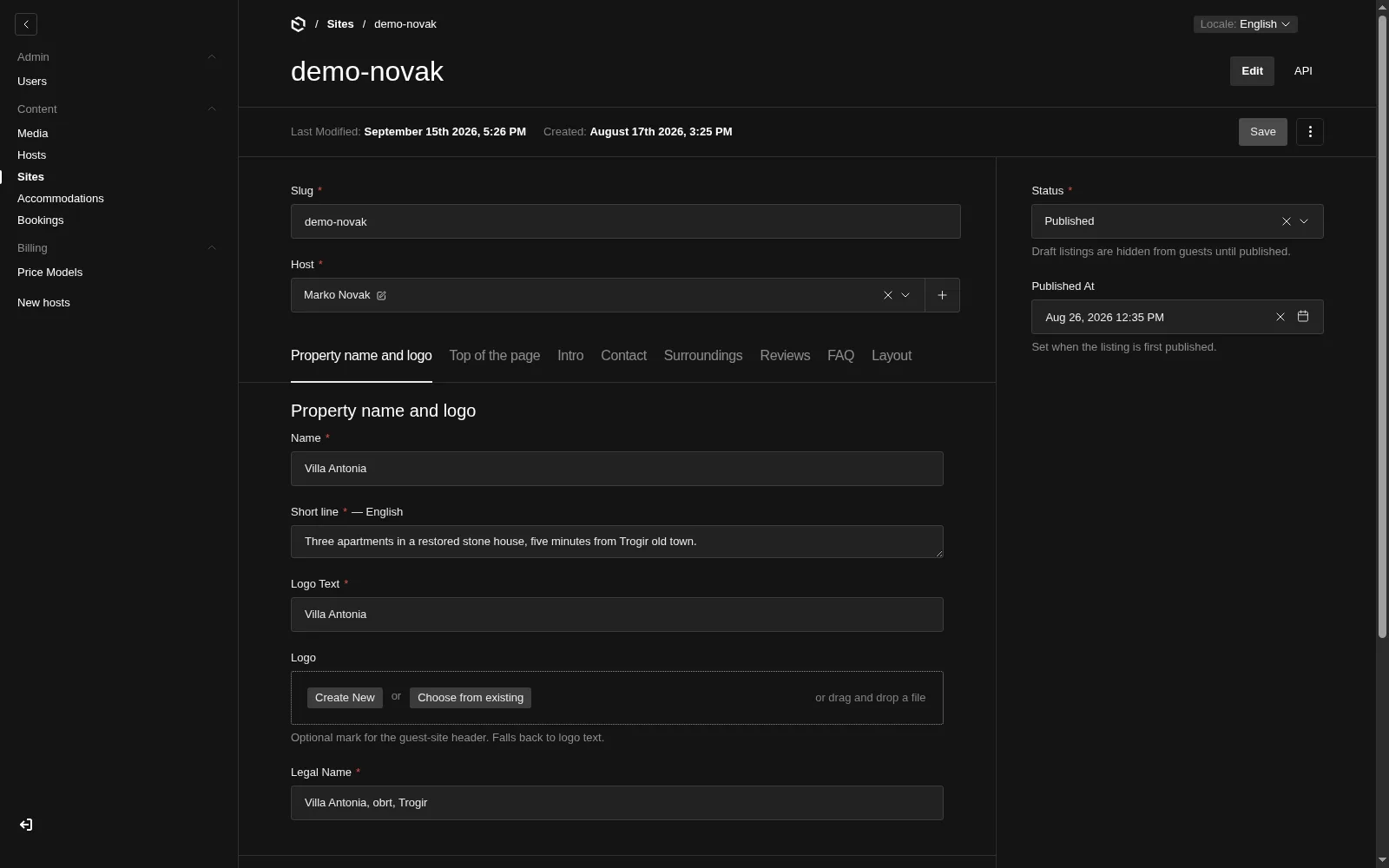
Modern interface
The admin panel is fast and tidy, and comes with dark mode, tabs, relationship fields, a media library, versions and multilingual content. In Hostcraft, many texts can be maintained per language (German, English, Croatian). A localized: true on the field is enough, and the language switcher appears in the back end automatically.
The interface comes from the configuration, so there is no separate admin code to maintain. New fields show up in the back end immediately.
Flexibility
Payload hardly prescribes any structure. You build the content models yourself, and everything can be extended:
- Collections and fields (groups, tabs, relations, selects, uploads …)
- Access control at collection and field level, including filters per user
- Hooks that run before and after saving
- Custom React components in the admin panel, for example dashboards or entirely custom views
- Auth with roles, lockout after failed attempts and password reset, built in
In Hostcraft, every host can only access their own accommodations, websites and bookings. That isn't custom permission logic, just a few lines of access control:
export const ownSiteOrOperator: Access = ({ req: { user } }) => {
  if (!user) return false
  if (isOperator(user)) return true

  const hostId = getUserHostId(user)
  if (!hostId) return false

  // Hosts only see sites that belong to them
  return { host: { equals: hostId } }
}
The function returns either true/false or a filter that Payload applies directly to the database query. For a multi-tenant system like Hostcraft this is very practical.
Because the Local API can also be used outside the admin panel, Payload and the app itself aren't separate. The public front end, the host dashboard and the booking logic read from and write to the same collections. I only use the admin panel as the operator. Hosts get their own, simpler dashboard that I built myself.
AI compatibility
The code-first approach convinced me here, too. The entire data model lives in TypeScript files in the repository. An AI assistant in the editor sees collections, fields, access control and hooks without having to operate a back end or inspect a database. New fields, collections or permissions can be added via prompt, and everything is traceable as a Git diff.
On top of that there is payload generate:types: the configuration produces a payload-types.ts with all types. The assistant gets precise feedback from the TypeScript compiler when it uses a field incorrectly. That is a big difference from CMS systems where the schema lives somewhere in the database.
There is also an official MCP plugin that lets AI clients read and create content, respecting access control of course. I haven't tried it yet, but it's a good sign that Payload is taking this direction seriously.
Free, with no licence model
Payload is MIT-licensed. There is no Pro version, no per-site price and no limit to one user. For a SaaS product where many hosts work on the same installation, that is a real argument.
Disadvantages
Server requirements
Payload is neither a static site nor a classic PHP CMS. It needs a permanently running Node.js process and a database. Cheap shared hosting is out; a VPS (for Hostcraft a server at Hetzner) is the minimum.
- Node.js 22, with pm2 as process manager in my case
- Postgres (or MongoDB or SQLite)
- A reverse proxy that handles SSL
- Enough memory for
next build, since I build on the server and the admin panel adds to the build - Persistent storage for uploaded files (a
media/folder in my case), unless you connect S3 storage
Local setup is also more effort than for a Markdown-based site. I start Postgres in a container, and the node_modules alone are around 2 GB. For a small brochure site Payload is therefore overkill.
Deployment – a conditional disadvantage
In day-to-day use, deployment runs via GitHub Actions for me: fetch the code, install dependencies, back up the database, run migrations, build, reload the process. That isn't a Payload-specific problem but normal for a Node app with a database. Still, there are points worth knowing:
- Schema push vs. migrations: In development mode Payload syncs the database with the configuration automatically. Production needs real migrations (
payload migrate:createandpayload migrate). If you forget, you only notice at deploy time. - The marker from the dev push: The local push leaves an entry in
payload_migrations(withbatch = -1). After that,payload migrateasks for interactive confirmation and hangs in an SSH deploy until the timeout hits. My deploy script removes this entry before migrating. - Content belongs to the database: Unlike a flat-file CMS, content can't be moved via Git. For the initial launch I have a script that backs up the database and the
media/folder locally and transfers them to the server. Git revision andPAYLOAD_SECREThave to match for that. - Content Security Policy: In production the admin panel needs
unsafe-eval. The strict CSP of the public site therefore has to be configured separately for/admin.
Once set up cleanly, it runs reliably. New projects should plan for migrations from the start rather than just before the first release.
Dependency on Next.js
Payload 3 is tightly interwoven with Next.js. The admin panel is a Next app, the configuration is hooked in through withPayload in next.config.ts, and the Payload and Next versions have to match. As a result:
- Next updates and Payload updates have to fit together. Next regularly ships breaking changes, and Payload releases new versions very frequently. Updates should be planned deliberately.
- React is mandatory. If you otherwise use Vue and Nuxt, like I do for most projects, you can use Payload headless, but you still run a Next app just for the back end.
- The lock-in is noticeable. The Local API and the admin components are closely tied to the Next app. Switching the front end later is possible, but not trivial.
If you work with Next.js anyway, you get almost only advantages: one repository, one deployment, shared types.
Uncertainty after the Figma acquisition
In June 2025 Figma acquired the Payload team (announcement by Figma, announcement by Payload). Both sides promise that Payload stays open source and self-hostable, that the team keeps working on Payload, and that nothing changes for existing users for now.
That's reassuring, but "for now" is the key phrase. Figma is building its own CMS, and Payload is meant to provide the foundation for it. Payload's roadmap will therefore also depend on the interests of a large company, which is hard to judge from the outside:
- Will Figma keep developing the open-source core, or will the focus shift to commercial products?
- Will the MIT licence remain in place in the long run?
- How long will the features I use today keep being developed in the core?
So far there is no reason to panic, as the core is still MIT-licensed and actively maintained. Still, you should factor this uncertainty in when choosing a CMS for a long-lived project. The risk is manageable because the data sits in Postgres and the configuration in TypeScript, so both can be reused without Payload if needed. A switch would still take effort, though.
Conclusion
For me, Payload is the CMS that fits Next.js projects best, and I'd use it again for web apps with real logic, user roles and multiple tenants. The admin panel is modern, the data model can be shaped freely, and because everything lives in TypeScript, working with AI assistants is excellent.
The disadvantages are manageable but real: a server of your own with Node.js and a database, a deployment with clean migrations, the close tie to Next.js, and the open question of where Payload is heading under Figma. For simple sites where editors only change a few texts, there are lighter solutions. For a product like Hostcraft, Payload was the right choice.