Statamic CMS – Lessons from Two Projects
A flat-file CMS built on Laravel: Git integration, a modern interface and AI compatibility – but also price, caching and server requirements
Stefan Flaschko · 09.10.2026



I've now used Statamic in two client projects: a conference website with programme, speakers and exhibitors, and the site of a network organisation with events, locations and articles. Both run on Statamic 6 and Laravel 13. Time for an honest interim review.
What is Statamic?
Statamic is a content management system built on Laravel. At its core it is a so-called flat-file CMS: content isn't stored in a database but as Markdown and YAML files right in the project directory. On top of that comes a Control Panel (the backend) where editors manage content without ever touching a file.
The frontend is built with the Antlers template language or with Blade. Statamic can also be run headless.
Advantages
Git integration
Since all content is stored in files, the entire project can be versioned in Git – code, templates, field definitions and content. That's a real difference to WordPress & co., where content lives in the database and has to be painstakingly synchronised between your local environment and the server.
With the Pro edition, Statamic can even commit and push changes made in the backend automatically. An editor saves an entry, and shortly afterwards the commit shows up in the repository. Every change is traceable and can be rolled back if needed.
Modern interface
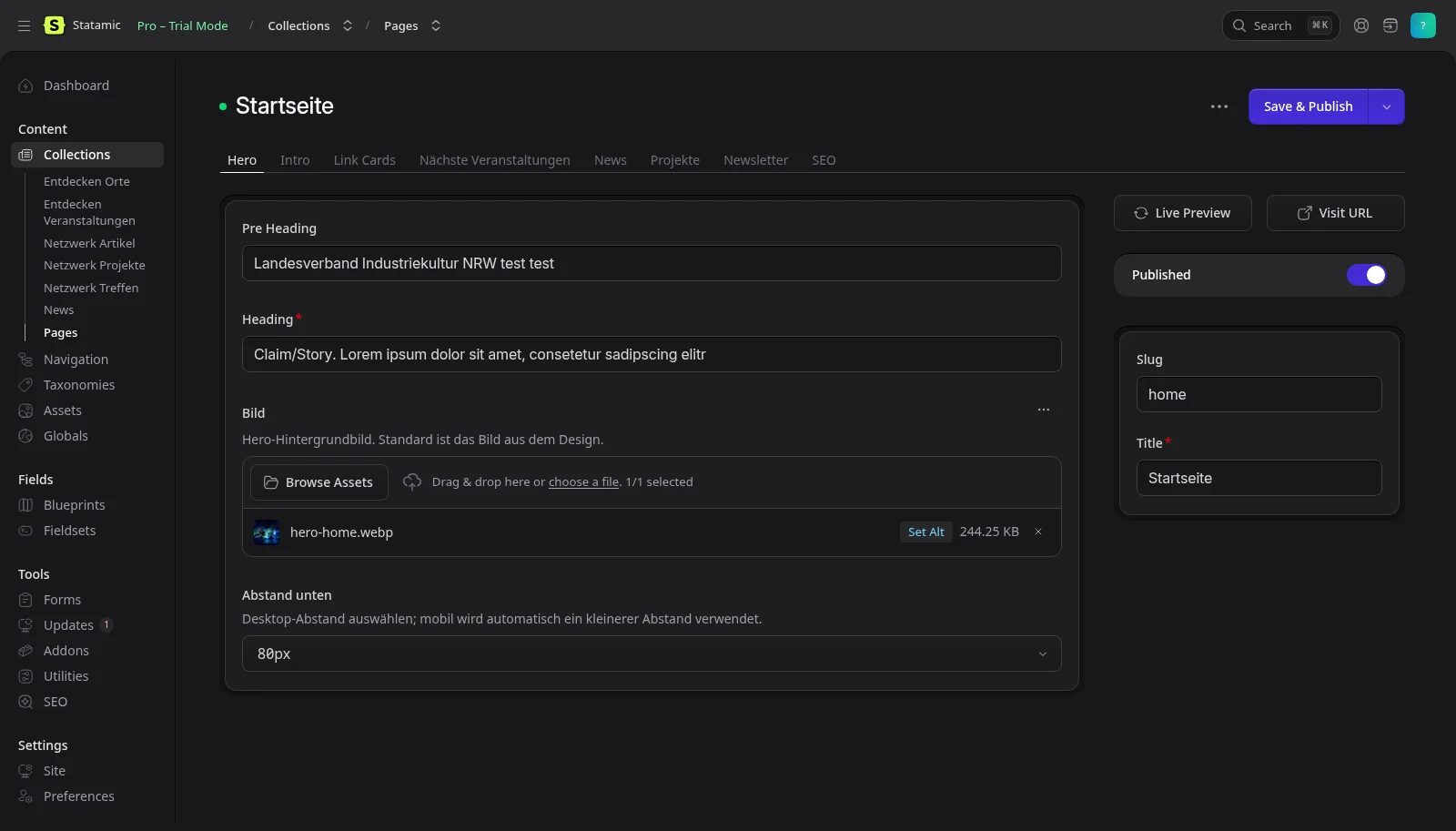
Since version 6 the Control Panel has been completely redesigned and feels very modern: fast, tidy, with dark mode, live preview and a global search (Ctrl + K). Fields are defined in blueprints and organised into tabs and sections. That way the backend looks exactly the way the project needs it for each content type – nothing more, nothing less.
For clients this was a big plus. Onboarding took much less time than I'm used to with other systems.
Flexibility
Statamic doesn't force a structure on you. You build your content models yourself:
- Collections for pages, news, events, speakers …
- Blueprints and fieldsets for the fields, including Replicator/Bard/Grid for flexible page building blocks
- Taxonomies, globals and navigations
- Roles and permissions, for example "Content Editor" and "Site Manager" with precisely defined rights
Because it's Laravel, everything can be extended: custom controllers, commands, scheduler (for us: importing external API data), queues and addons. If something is missing, you just write it in PHP.
Flat-file CMS
No database means no database server, no dumps, no migration headaches between staging and production. An entry looks like this:
---
id: 6f0c4a1e-0000-0000-0000-000000000000
title: Opening keynote
published: true
start: '2026-10-09 10:00'
---
The content goes here as plain **Markdown**.
It's easy to read, easy to back up and easy to move. Cloning a project means git clone, composer install – done. Users and roles are files as well. A database is only needed for Laravel internals, if at all – in our case a small SQLite file does the job.
AI compatibility
Because everything in Statamic is stored in files, an AI assistant in your editor can read and understand the whole project: templates, blueprints, content, configuration. It can create new collections, add fields, adjust entries or refactor templates without needing access to a database or an API. Everything also shows up in the Git diff, which makes it easy to review.
Disadvantages
Price
Statamic Core is free, but comes with limitations, most notably a single user account. As soon as you need several editors, roles, revisions, multiple languages/sites or the Git integration, you need Pro. Since May 2026 that costs $349 per site (one-time, includes one year of updates), then $99 per year for updates and support. Before it was $275 and $65.
For a client project that's manageable. For hobby projects, small club websites or when you run lots of small sites, it's a noticeable expense compared to WordPress. So include the price in your quote from the start. On the plus side, forms, static caching and a navigation builder are already included, for which other systems often require paid plugins.
Caching
To keep a file-based system fast, Statamic uses the Stache, a cache index over all content. On top of that come the regular Laravel caches (config, routes, views) and optionally static caching.
In practice this means: if something looks "odd" after a deployment, it's almost always the cache. In our case, for example, a config cache with wrong absolute paths caused a 500 error. After every deploy, cache:clear, config:clear and statamic:stache:clear are a must. If you use static caching, you also need to think about invalidation.
Server requirements
Statamic is a Laravel application and needs a matching environment:
- PHP 8.3+ (8.4 in some of our setups)
- Composer and ideally SSH access
- Write permissions for
storage/andbootstrap/cache - GD or Imagick for image processing (Glide)
- Cron for the Laravel scheduler
Cheap shared hosting with an old PHP version is out. At one host the account's default PHP version was still 7.4, so PHP had to be switched explicitly via .htaccess and php84 had to be used instead of php on the CLI. Compared to a static Nuxt site on Netlify or simple WordPress hosting, that's considerably more effort.
Deployment – a conditional disadvantage
Deployment itself is actually unproblematic: GitHub Actions builds vendor/ and the assets, transfers them to the server, and a few Artisan commands run afterwards. That's not specific to Statamic, it's everyday Laravel. Still, there were a few stumbling blocks:
- nginx and Glide: Image variants (
/img/...) returned 404 because the default configuration intercepts static file extensions like.webpbefore PHP gets a chance. You need a dedicatedlocationrule. open_basedirwas set too restrictively on Plesk.- Permissions and directories:
storage/logswas missing after the deploy because the directory wasn't in the repository. - Content vs. code: This is the real catch. If editors change content on the server and a code deploy later overwrites those files from the repository, the changes are gone. You either exclude
content/from the deploy or rely on the Git integration – which then has to play nicely with the deploy so pushes don't fail with "non-fast-forward".
Once it's set up properly, it runs reliably. But if you're starting out, plan for these points from day one.
Conclusion
Statamic is one of the most pleasant CMSs I've worked with so far. The combination of Git workflow, modern backend and full customisability is a great fit for projects where editors need a comfortable interface while developers still want full control over code and structure. The fact that everything lives in files also makes working with AI assistants much easier.
The downsides are manageable, but real: the price of Pro, a server with a current PHP version, and a bit of discipline around caching and deployment. For simple, small sites without editors or with a tight budget, there are other options that may fit better. For client projects with real requirements, I'd use Statamic again any time.