PocketBase – Lessons from LingoDeck
A backend in a single file: a modern interface, simple deployment and flexibility – but also no SQL through the API, a pre-1.0 status and an admin panel that can't be extended
Stefan Flaschko · 08.09.2026



I used PocketBase for LingoDeck, a flashcard app for language learning with spaced repetition, AI-generated cards and text-to-speech. The front end is a Nuxt 4 app, and the back end is PocketBase 0.30 with the JavaScript SDK. Time for an honest review.
What is PocketBase?
PocketBase is an open-source back end (MIT licence) that consists of a single executable file. It is written in Go and ships with everything important:
- a SQLite database that lives as a file next to the program
- a REST API for every collection, plus realtime subscriptions
- authentication with email and password, OAuth2 and more
- file uploads, stored locally or in S3
- an admin panel for managing collections, fields, access rules, logs and settings
- hooks and migrations in JavaScript (alternatively, PocketBase can be extended as a Go framework)
You start the file with ./pocketbase serve and have a working back end. There are SDKs for JavaScript and Dart. In the app, the Nuxt pages and the Nuxt server talk to PocketBase through the JS SDK. I haven't needed realtime or OAuth so far.
Advantages
Modern interface
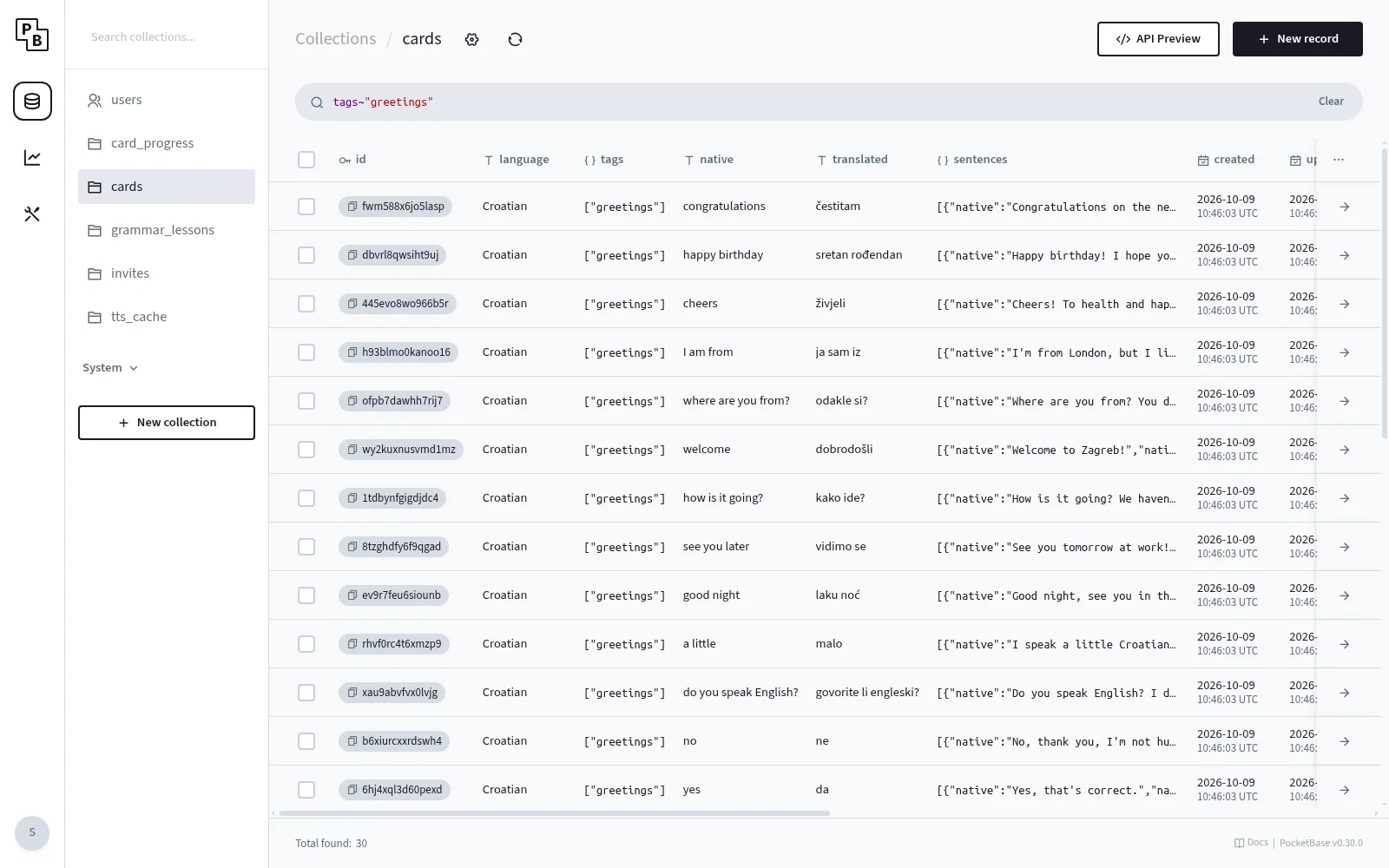
The admin panel is fast, tidy and surprisingly complete for a back end you install in a minute. The screenshot shows the cards collection with search and filter. Everything else is in one place too:
- Collections and fields with types such as text, number, select, relation, JSON, file and autodate
- Access rules as an expression per action (list, view, create, update, delete), with an editor and autocompletion
- API Preview, which shows ready-made example requests for every collection
- Logs and statistics for requests
- Settings for mail, file storage and automatic backups
The interface is aimed at developers, though. It is not a replacement for a classic CMS when editors maintain content. More on that below.
Flexibility
The data model is free, and the access rules are more powerful than they first look. Every collection has five rules (list, view, create, update, delete), and each of them is a short expression. Users may, for example, only see and create their own records:
notes.listRule   = 'owner = @request.auth.id'
notes.createRule = '@request.auth.id != "" && owner = @request.auth.id'
Or content is publicly readable, but can only be changed by signed-in users who created the record themselves:
articles.listRule   = ''
articles.updateRule = '@request.auth.id != "" && author = @request.auth.id'
An empty rule means "everyone", null means "superusers only".
There is no middleware and no endpoint that checks this. PocketBase evaluates the rules on every request, even when someone calls the API directly. That saves you custom permission logic.
When rules aren't enough, there are several options:
- JS hooks and custom routes (
pb_hooks) directly inside the program - Go extension, when you embed PocketBase as a framework in your own Go project
- A separate server in front. A Nuxt or Node server can check the login via
auth-refreshand then call external APIs whose keys shouldn't end up in the browser.
The limit is the admin panel. It can't be extended. There are no custom views, dashboards or fields in the back end. If you need, say, your own user management or a dashboard, you have to build it in the app yourself, and I wouldn't use PocketBase for clients without building a custom interface. With Payload or Statamic, that is easier.
AI compatibility
This is a mixed bag. On the plus side, almost everything can be described as text:
- Migrations are JavaScript files in the repository. Collections, fields, indexes and rules are traceable as a Git diff, and an assistant can write new migrations.
- Rules are short expressions. You can read them, review them and change them with a prompt.
- The API is small. The SDK is essentially
getFullList,getList,create,updateanddelete, plusfilter,sortandexpand. - For hooks, PocketBase ships a type file (
types.d.ts) that the editor and the assistant can use.
Less good: the truth about the schema lives in the database, not in the code. Unlike a code-first system such as Payload, an assistant only sees the schema if the migrations are complete. And the risk of outdated code is real. PocketBase changed a lot with version 0.23, and many examples online still belong to the old API. In my case, the first migrations were written against an older version. As a result, created and updated were missing, and sorting by -updated failed with a 400 error. An additional migration fixed it.
My conclusion: well suited as long as you keep the migrations in the repository and tell the assistant which version you use. In my project, that is written down in AGENTS.md, together with the rules and quirks.
Deployment
This is the biggest advantage for me. A deployment is a single file, and in my setup it works like this:
- GitHub Actions builds the Nuxt app and uploads it to the server.
- The files from
pb_migrations/are uploaded. - PocketBase is restarted with pm2 and applies all new migrations on startup.
- A health check (
/api/health) confirms that it is running again.
There is no database to install and maintain separately, and no dependencies to build. Updating PocketBase itself is a new file as well (./pocketbase update). Operation is simple too: PocketBase listens on 127.0.0.1:8090, and nginx forwards /pb there and handles SSL.
Two things to keep in mind:
- PocketBase is briefly unavailable during a restart. For an app of this size, that doesn't matter.
- Changes made in the admin panel on the server automatically create migration files, but there and not in the repository. If you prefer clicking collections together in the panel, you have to download the generated files from the server and add them to the project afterwards. I therefore prefer to write migrations by hand. Even settings like the login token lifetime (30 instead of 7 days) live in a migration. A change made only in the panel would otherwise be lost on a fresh
pb_data.
Few resources and free
The file is about 32 MB. On my machine, the process used about 60 MB of memory with roughly 500 records. There is no licence, no per-user pricing and no limit to one project. In return, you take care of the server and backups yourself.
Disadvantages
Server requirements
Here you have to distinguish. The requirements are low, but PocketBase is not static hosting. It needs:
- a permanently running process, pm2 in my case
- persistent storage for the
pb_datafolder with the database and uploads - a reverse proxy for HTTPS
- Shared hosting is out. A small VPS is enough, though, and in my setup PocketBase shares the server with the Nuxt app.
Compared with a Node-based CMS that is an advantage, compared with a site builder or static pages it is a disadvantage. On top of that, SQLite allows exactly one write at a time and can't be spread across several servers. For an app on one server that's no problem. If you want to scale horizontally, PocketBase is a problem.
No real SQL
This is only partly true, so here is a closer look. Under the hood PocketBase is real SQL, because the data lives in a SQLite file. From the outside, though, access doesn't go through SQL but through its own API with its own filter syntax:
const defaults = await pb.collection('cards').getFullList({
  filter: 'owner = ""',
})

const progress = await pb.collection('card_progress').getFullList({
  expand: 'card',
})
That is pleasant for most queries, but it is no more than what the API offers:
- Joins only exist through relations and
expand. - Reports with GROUP BY, sums or counts are not possible through the API.
- If you want to connect another tool, you can't simply connect to a database. The file belongs to PocketBase, and a second access from outside is not a good idea.
There are ways out. View collections are defined with your own SQL SELECT; they are read-only but can be queried like any other collection. In hooks you can also run raw SQL. If you expect joins, reports and complex queries from the start, choose a classic database such as Postgres instead. PocketBase doesn't support any database other than SQLite.
The pre-1.0 status
PocketBase is still version 0.x. The project itself points out that backward compatibility isn't guaranteed before 1.0. The move to 0.23 showed that: collections and migrations were reworked, and old examples no longer work. With your own migrations and pinned versions it is manageable, but you should plan an update deliberately and not take it along with the next deploy.
On top of that, PocketBase is essentially maintained by a single person. The project is very active and stable, but for a long-lived product you have to accept that risk. Because the data sits in a SQLite file and the API rules are readable, a later move would still be possible.
Data and backups aren't in the repository
As with any back end that has a database, the content isn't part of Git. The migrations only describe the structure. If PocketBase starts without the pb_data folder that holds the database (on a new machine or a rebuilt server), it begins with an empty database. The migrations then create the structure but no content, and the app starts with empty collections.
PocketBase can create backups automatically, including to S3, but you have to set that up and test it now and then. A backup is only a backup once you've restored it successfully.
Small stumbling blocks
- Rules compare text exactly. A comparison with
[email protected]doesn't match[email protected]. You should therefore lowercase email addresses in the form already. - Email addresses are hidden by default. PocketBase only returns them to the owner of the record. For the user list in the admin area I had to set
emailVisibility. - No SMTP, no mails. As long as no mail server is configured, PocketBase can't send verification mails or password resets.
Conclusion
PocketBase is a good fit for small to medium apps with login, user data and clear access rules, especially when you run the back end yourself and want as little infrastructure as possible. The admin panel is modern, the rules save a lot of back-end code, and deployment is as simple as it can be for a back end with a database. With migrations in the repository, AI assistants work well with it too.
The disadvantages are real: there is no SQL through the API, the admin panel can't be extended, scaling is limited to one server, and with version 0.x you have to plan updates carefully. For projects where editors maintain content, I would choose a CMS such as Payload or Statamic. PocketBase is an interesting product, but for a new project I would choose a different system such as Payload or Appwrite.